Screen-Free Week Challenge Chart: Free Printable for Kids

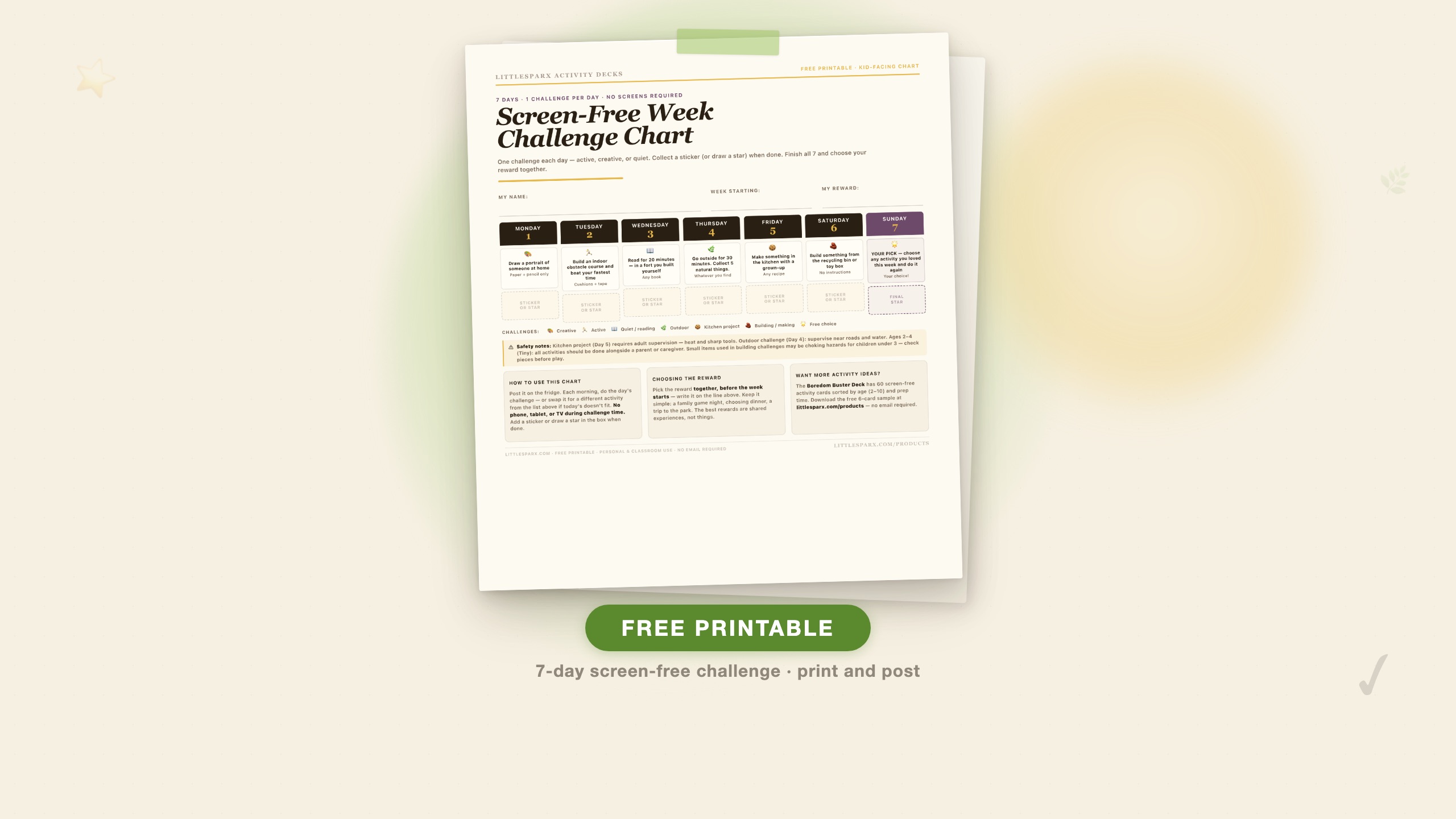
What this is: A free one-page printable chart for kids — 7 days, one activity challenge per day, a sticker box for each completed day, and space to write the agreed-upon reward at the top. Post it on the fridge at the start of the week. The chart tracks itself.
Download the Screen-Free Week Challenge Chart — free PDF · or visit the printable’s download page for the what’s-inside breakdown and FAQ.
Reducing screen time for a week sounds like a discipline exercise. That framing makes it harder than it needs to be, because it puts the parent in the enforcement role and the child in the resistance role. The challenge chart reframes it: this is an adventure with a visible finish line, a daily achievement to collect, and a reward agreed upon in advance.
Parents who use structured challenge systems in place of open-ended “no screens” rules tend to have better compliance, according to child behaviour researchers. The key is specificity — not “we’re cutting back on screens this week” but “here is exactly what today’s challenge is, here is how you’ll know you’ve done it, and here is the box where you put your sticker.”
What makes a screen-free week actually work
Most screen-free week attempts fail within two or three days. The reason is almost always the same: the screen time was removed without an adequate replacement system. Children — especially those used to screens as their default boredom solution — experience genuine distress when that option is gone, and unless something fills the gap, they escalate until the rule is abandoned.
The challenge chart solves this by making the replacement concrete and visual.
Specificity beats vagueness. “Don’t use screens today” is a prohibition. “Today’s challenge is: build an indoor obstacle course and beat your fastest time” is a goal. Children respond better to goals than prohibitions, and the chart provides a different goal each day so the week has variety built in.
The sticker system externalises the reward. Rather than relying on internal motivation (which is hard to sustain for seven days), the sticker box gives children an immediate, tangible reward for completing each day’s challenge. The visual progress across the week also builds momentum — by day four, most children are invested in completing the chart.
Pre-agreed rewards remove negotiation. Write the reward at the top of the chart before the week starts, and agree on it together. This eliminates the “but what do I get?” loop mid-week and gives the child a concrete goal to work toward. The best rewards for this context are shared experiences: choosing the Saturday activity, picking dinner one night, a family game night. These are more effective motivators than purchased items for most children in this age range.
How to run the screen-free week
Before the week starts (10 minutes): Print the chart. Fill in the child’s name and the start date. Talk through the seven challenges together — make sure each one is something they can actually do given your household’s resources. If Day 4 (outdoor challenge) is not feasible because of the weather or your living situation, cross it out and write in a substitute. Then decide on the reward together and write it in the box.
Each morning: Point at the chart. Remind them what today’s challenge is. That is the entire morning setup. No lecture needed.
The first 5 minutes matter most: Whichever challenge it is, join them for the first five minutes. Set out supplies. Start the obstacle course together. Flip through a few pages of the book with them before handing it over. The friction is in starting — once an activity has momentum, most children in the 4–10 age range will sustain it independently. Practitioner reports from early childhood educators consistently identify starting friction as the main point where screen-free activities fail, not sustaining them.
When the challenge is done: Put the sticker in the box. If you do not have stickers, draw a star or let them colour in the box. The physical act of marking completion is part of the system — do not skip it.
If a day’s challenge genuinely does not work: Swap it. The chart is a tool, not a test. If the kitchen project is not possible on Thursday because you are out of ingredients, move it to another day or substitute a different challenge from the menu. The point is completing seven days of intentional screen-free engagement, not completing them in the exact order printed.
The 7 challenges on the chart
The chart includes these challenges by default — one per day, covering all the main activity categories:
- Monday (Creative): Draw a portrait of someone at home — paper and pencil only.
- Tuesday (Active): Build an indoor obstacle course and beat your fastest time.
- Wednesday (Quiet / reading): Read for 20 minutes in a fort you built yourself.
- Thursday (Outdoor): Go outside for 30 minutes and collect 5 natural things.
- Friday (Kitchen project): Make something in the kitchen with a grown-up.
- Saturday (Building / making): Build something from the recycling bin or toy box with no instructions.
- Sunday (Free choice): Repeat any challenge you loved most this week.
Sunday is intentionally open because by day seven, children typically have a strong preference for one activity from the week — letting them choose it again reinforces the message that these activities are genuinely enjoyable, not just rule-following.
Safety notes
The kitchen project (Friday by default) requires adult supervision throughout. Heat, sharp knives, and blenders are all genuine risks. The outdoor challenge requires supervision near roads and water. For children ages 2–4 (Tiny), all activities on the chart should be done alongside a parent or caregiver — the chart is designed for parents to read and interpret for this age group. Building challenges use recycling bin materials that may include small pieces — check that items are larger than 1.75 inches before children under 3 use them.
None of the seven challenges require purchased supplies. The only exception is the kitchen project, which depends on what is available in your kitchen — simplify to something as basic as spreading peanut butter on crackers or arranging fruit on a plate if needed.
What to do when a child refuses the challenge
Refusal usually peaks around days two and three. This is the natural dip in a behaviour change arc — the novelty of the first day has worn off and the reward is not yet close enough to be motivating.
Do not renegotiate the no-screens rule. Giving in during the dip teaches that persistence breaks the system. Hold the boundary and redirect to the challenge.
Lower the bar for the specific challenge. If building an obstacle course sounds overwhelming, start smaller: one cushion on the floor, one piece of tape. The child can expand it once started.
Work alongside them longer. The first-five-minutes rule sometimes needs to stretch to fifteen on hard days. That is still a better outcome than abandoning the week.
Use the chart as the authority. “The chart says today is the obstacle course” removes the parent from the position of villain. The chart is the rule; the parent is just the helper.
Building on the week
A screen-free week is most effective as a reset rather than a permanent restriction. The goal is not to eliminate screens permanently but to demonstrate — to both parent and child — that a full week of screen-free afternoons and evenings is achievable, and that the week contains genuinely engaging alternatives.
After the week is over, the chart can serve as a reference: which challenges produced the most engagement? Those are the activities worth investing in further. If the building challenge went for 90 minutes on Saturday, that is a signal about what kind of play this child finds absorbing. It is useful information for the Boredom Buster Deck setup — load the jar with cards in those categories.
For a complete list of screen-free activities for ages 5–8 with realistic engagement-time estimates, see our 47 screen-free activities for ages 5–8 rainy day guide. That post covers the same activity types as the chart but with enough depth to fill an entire rainy season, not just one week.
For parents of younger children (ages 2–3), see the sensory bin ideas for toddlers guide — the challenge chart activities can be adapted for this age group using sensory versions of each category (a sensory bin instead of an obstacle course, finger painting instead of portrait drawing).
Download
The chart is one US-Letter page. Print it on regular paper and post it on the fridge at eye level for your child. Fill in the name, date, and reward before posting. No email, no signup, no expiry date.
Download the Screen-Free Week Challenge Chart — free PDF
If you want a longer-term system beyond one week, the Boredom Buster Deck at /products gives you 60 screen-free activity cards sorted by age band — Tiny (2–4), Junior (5–7), Explorer (8–10) — that you can use in a jar on the counter for the rest of the year. The free 6-card sample is always available with no email required.
Common questions
What age is the screen-free week challenge chart for?
The chart is designed for children ages 4–10 to read and use with parent support. For ages 2–4 (Tiny), the parent interprets each challenge and adapts it — the physical chart is the tracking tool, not something the child reads independently. The sticker/star system works from approximately age 3 upward.
Do we have to do all 7 days in a row?
The chart is designed as a consecutive seven-day challenge because continuity builds momentum. Skipping days and resuming tends to reset the momentum each time. That said, if a day genuinely cannot happen (travel, illness), mark it with a note and continue — a six-day week with one skip still counts as a completed challenge.
My child asks for screens constantly even during the challenges. What do I do?
Expect this to peak in days two and three. Keep the response consistent: 'The challenge isn't done yet — finish that and then we can talk.' The key is not to renegotiate during the dip. Once the day's challenge is complete and the sticker is in, the conversation can happen on more neutral ground. Many families find that by day four or five, the requesting drops significantly as the child becomes invested in completing the chart.
Can I use this chart for multiple children?
Yes — print one per child if they are different ages and need different challenge adaptations, or use one chart shared by siblings if they are close in age and doing the challenges together. Sibling pairs often sustain the active challenges longer than solo children because they provide each other motivation.