Rainy Day Activity Menu: Free Printable for the Fridge

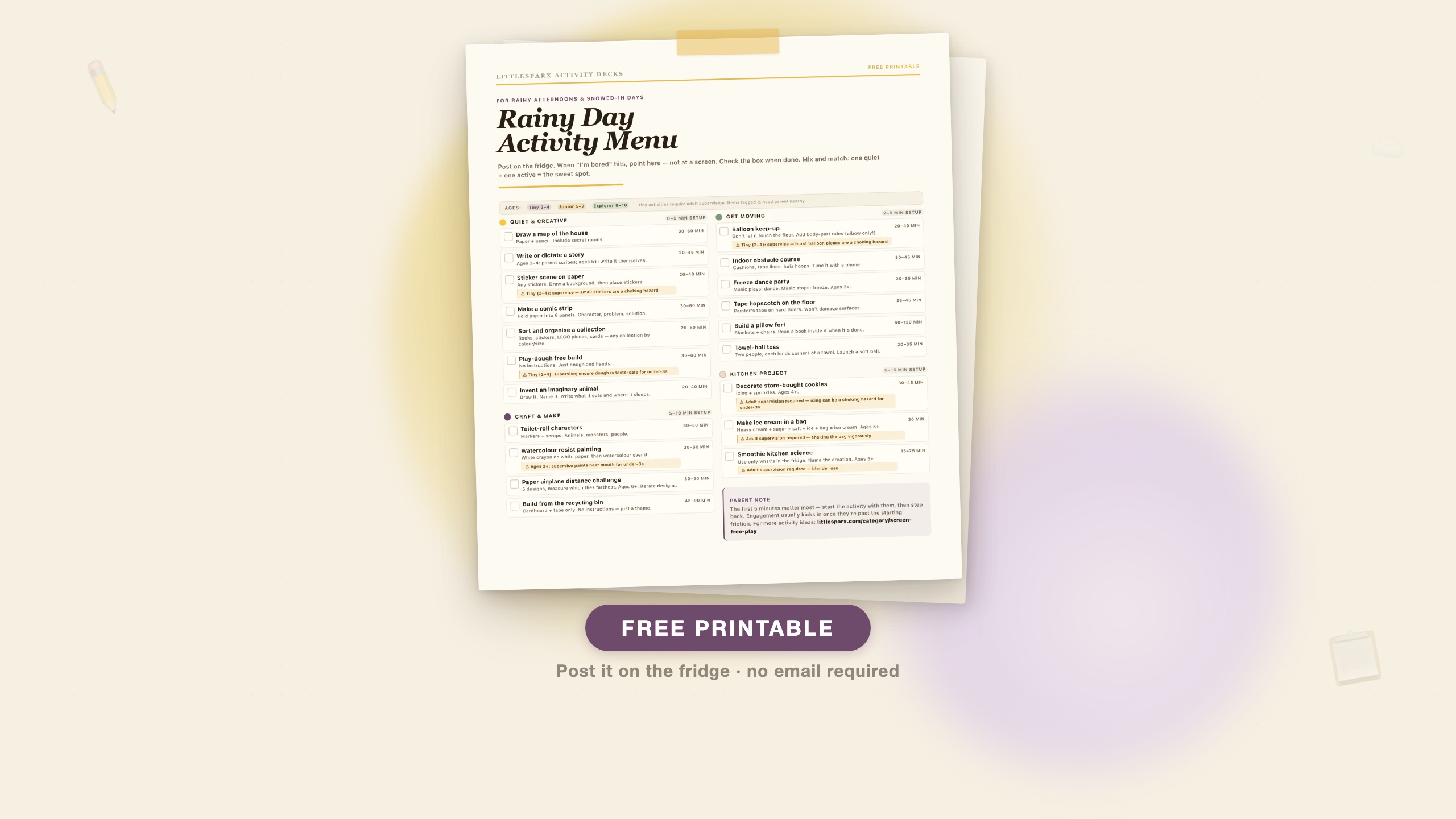
The short answer: Print this one-page menu, post it on the fridge, and point at it the next time “I’m bored” happens on a rainy afternoon. Twenty screen-free activities sorted by category — quiet, craft, active, and kitchen — with checkboxes, realistic time estimates, and safety flags for younger children. No email required.
Download the Rainy Day Activity Menu — free PDF · or visit the printable’s download page for the what’s-inside breakdown and FAQ.
Rainy days compress the usual decision fatigue into about 45 minutes. By late morning, the novelty of staying in has worn off, a screen is right there, and the path of least resistance is obvious. Most parents give in — and then feel bad about it. Pew Research Center (October 2025) found that 28% of parents give in to screen time to avoid a meltdown multiple times per week. That is not a parenting failure; it is a system failure. There is no ready-made alternative waiting.
The activity menu is the ready-made alternative. It solves the system problem rather than the willpower problem.
Why a menu works better than a list
A list of 100 activities is not a tool. It is research. It requires the parent to read, filter, and decide in the moment — which is the opposite of what you want when a child is already in “I want a screen” mode.
A menu posted on the fridge is different because:
The decision is already made. Everything on the menu is pre-approved, age-appropriate, and doable with what you have at home. The only decision the child needs to make is which category.
It is physical and visible. A fridge printable is more durable as a household system than a phone note or a mental catalogue. The child can walk up to it, point at something, and start — without involving a parent’s screen.
Checkboxes create a natural goal. Parents who have used similar systems in early childhood settings report that the checkbox element is genuinely motivating for children ages 4 and up. The checkbox is the reward, not a prize they earn for completing it.
Categories match parent context, not child mood. The four categories on this menu — Quiet & Creative, Craft & Make, Get Moving, Kitchen Project — map to what the parent can manage in the moment, not just what the child wants to do. Quiet activities are there for the days when the parent is on a call. Active activities are there for when energy needs to go somewhere.
How to use the menu
Step 1: Print and post. Print on regular paper (cardstock lasts longer, but printer paper works fine). Post on the fridge with a magnet, or tape it at child height on a cupboard door.
Step 2: Before the rainy day starts, do one walkthrough. Run through the activities with your child on a calm morning, not in the middle of a “I’m bored” moment. Note which ones they are excited about. Circle two or three favourites with a marker.
Step 3: When “I’m bored” arrives, point. The response to “I’m bored, can I watch something?” is “look at the menu and pick something.” Not a negotiation; not a list of options you have to generate on the spot. Point at the fridge.
Step 4: Start with them for the first 5 minutes. This is the most important step that is easiest to skip. The friction point for most activities is the first five minutes of getting started. Sit down at the table, set out the supplies, draw the first line. Once the activity has momentum, the child sustains it independently. Parent can step back after that.
Step 5: Check the box together. When the activity is done, the child checks the box. This matters more than it sounds — it creates a record of what they chose and what they did, which reinforces the menu as a system rather than a one-time thing.
Safety notes for ages 2–4
The menu covers a wide age range (2–10), and several activities have specific notes for younger children. These are printed on the menu itself but worth stating plainly here:
- Sticker scenes: Small stickers are a choking hazard for children under 3. Supervise or use large foam stickers.
- Play-dough: Taste-safe play-dough is essential for children under 3 who will mouth materials. Standard store-bought play-dough is not taste-safe. A simple taste-safe recipe: 2 cups flour, 1 cup salt, 1 tablespoon vegetable oil, 1 cup water (add food colouring to the water). No cream of tartar needed.
- Balloon keep-up: A burst balloon’s fragments are a choking hazard. Supervise under-4s during balloon games and dispose of any deflated or burst balloons immediately.
- Watercolour resist painting: Standard watercolour paints are non-toxic but supervise children under 3 near any art supplies.
- Kitchen projects: All kitchen activities require adult presence. Blenders, ovens, and even sharp-edged tin cans are genuine hazards.
For children under 2, most items on the Quiet & Creative column can be simplified to sensory-friendly versions: plain paper and chunky crayons, large blocks, simple stacking. For a full set of age-appropriate sensory activities for toddlers under 3, see our sensory bin ideas for toddlers guide.
What to do when the menu is ignored
If your child walks up to the menu, reads it, and still reaches for the screen — the issue is not the menu. It is the transition.
If they are already mid-screen session: transitions away from screens mid-show or mid-game are harder than transitions at natural stopping points. Give a 5-minute warning before the activity menu comes out. Screens have endings; use them.
If nothing on the menu appeals: This is a signal that the menu needs refreshing, not that the child cannot manage without screens. Add new activities (the menu has a natural refresh cycle when all boxes are checked). Or use the Boredom Buster Deck — 60 activity cards they can shuffle and draw randomly, which introduces a chance element that makes selection feel less like a chore.
If they are overtired or hungry: No activity system competes with genuine physiological need. Check basics first. A hungry, tired child will not engage with even the most appealing activity.
The bigger picture: rainy days as a system
One menu solves one rainy day at a time. But rainy days cluster — a rainy week in July, a sick day in February, a weekend lockdown. The families who navigate these with least friction are the ones who have invested in a small physical infrastructure of screen-free options: a dedicated art supplies drawer, a craft box with no precious materials (so children can use freely without asking), an activity jar on the counter.
The Rainy Day Activity Menu is one piece of that infrastructure. For the jar piece, see our DIY Boredom Buster Jar guide — it uses a similar checkpoint system with 60 activity cards sorted by age band.
For the complete list of screen-free activities for ages 5–8 — including engagement-time estimates and honest setup-time ratings for each one — see 47 screen-free activities for ages 5–8. That post is the source we drew on for the time estimates on this menu.
Download
The menu is a single US-Letter page. Print it, fold it, post it wherever it is most visible. No email, no account, no expiry.
Download the Rainy Day Activity Menu — free PDF
If you want a more structured system — activity cards with age labels, choking-hazard flags for under-3s, and 60 ideas sorted by prep time — the Boredom Buster Deck is the paid upgrade. The free 6-card sample at /products gives you a sense of the format before you decide.
Common questions
What age range is the rainy day activity menu for?
The menu spans ages 2–10. Activities in the Quiet & Creative and Craft & Make columns are most accessible for ages 4+. The active and kitchen activities scale across the full range with adult support for younger children. Safety flags are printed directly on the menu for activities that require supervision with under-4s.
Can I customise the menu before printing?
The PDF is a flat print — you cannot edit it directly. But you can print it and cross out any activities your household cannot do (allergies that affect kitchen projects, no outdoor access, etc.), then add your own in the margins. The checkbox column works equally well for custom activities.
We tried the menu once and they ignored it. Is it worth posting again?
Yes. The first use is almost always rougher than subsequent uses. The menu becomes effective as a household system only after children have used it enough times to associate it with "this is what we do on rainy days." Give it three to four uses before drawing conclusions. The key habit is pointing at the menu consistently rather than offering screen time as the alternative in that moment.
Is there a version with more activities?
The paid Boredom Buster Deck at /products has 60 screen-free activity cards sorted by age band (Tiny 2–4, Junior 5–7, Explorer 8–10) and prep-time tier. Each card is formatted like a full activity brief with supplies and engagement-time estimate. The free 6-card sample at /products lets you try the format before buying.